AI Generation Prompt & Parameters
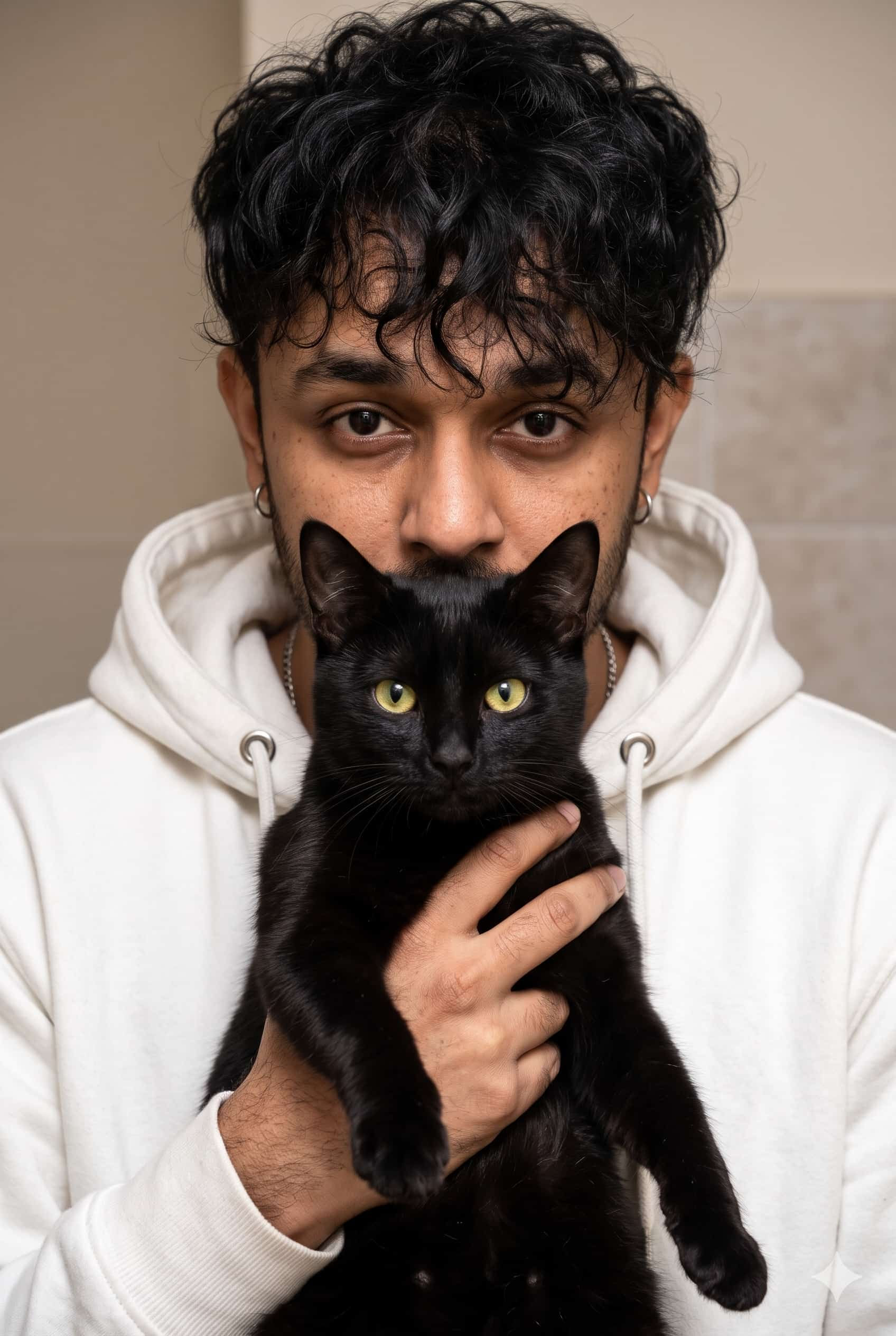
Create an ultra-realistic, high-resolution vertical portrait photograph of a young man holding a beautiful black cat close to his chest, recreating the exact composition, pose, lighting, and intimate aesthetic of the reference image. MAN'S APPEARANCE: A young adult man with thick, naturally curly, messy black hair falling loosely across his forehead. He has warm medium skin, expressive dark-brown eyes, thick natural eyebrows, a straight nose, subtle facial texture, and a clean-shaven or very lightly stubbled face. His gaze is directed straight into the camera, with a calm, slightly serious, confident expression. His face should look natural and unretouched, with realistic pores and fine skin details. He is wearing a relaxed white hoodie with the hood resting around his neck and shoulders. The hoodie has visible drawstrings, silver-colored eyelets, soft cotton fabric, and natural folds. A thin silver chain necklace is partially visible around his neck. He wears small silver hoop earrings in both ears. BLACK CAT: A beautiful medium-sized domestic black cat with sleek, glossy, completely black fur, pointed upright ears, long delicate whiskers, a small black nose, and striking bright yellow-green eyes with realistic vertical pupils. The cat has a calm, composed expression and looks directly at the camera. Its face is symmetrical, with soft highlights revealing the fine texture of its black fur. The cat is being held securely and gently against the man's chest with both hands. The cat's head is positioned directly in front of the lower half of the man's face, covering his mouth and nose while leaving his eyes, eyebrows, forehead, and curly hairstyle clearly visible above the cat's ears. The cat's body extends downward through the center of the image. One front paw hangs naturally over the man's hand, while the other paw rests comfortably near his fingers. The man's hands gently wrap around the cat's chest and body, showing realistic fingers, natural skin texture, and anatomically correct hand placement. POSE AND COMPOSITION: Tight vertical portrait in a 2:3 aspect ratio. The man stands facing the camera directly, holding the black cat at chest height. His face occupies the upper central portion of the frame, while the cat dominates the center and lower foreground. The cat's bright green eyes are a major focal point, positioned just below the man's eyes. Both faces are aligned centrally, creating a visually balanced and intimate human-and-pet portrait. Crop the image from slightly above the man's hair to around his mid-torso. Keep the man's eyes and the cat's eyes sharply focused. Maintain the exact relative positioning of the face, cat ears, hands, hoodie, and shoulders shown in the reference. BACKGROUND AND ENVIRONMENT: A simple indoor setting with a softly blurred neutral beige and light-grey tiled or plaster wall. Subtle natural imperfections in the background, no distracting objects, no decorations, and no text. The background should feel authentic and understated rather than like an artificial digital backdrop. LIGHTING AND PHOTOGRAPHY: Soft, warm indoor ambient lighting, gently illuminating the man's face and the cat's eyes. Balanced exposure with natural shadows beneath the curls, around the cat's ears, and between the hands and fur. Realistic reflections in the cat's yellow-green eyes. The black fur should retain visible detail instead of appearing as a flat dark silhouette. Shot on a professional full-frame DSLR camera with an 85mm portrait lens, f/2.8 aperture, shallow depth of field, natural color grading, sharp facial details, realistic fabric texture, lifelike fur strands, subtle cinematic warmth, candid editorial photography, high dynamic range, photorealistic 8K-quality detail. STRICT NEGATIVE PROMPT: No cartoon, no anime, no illustration, no CGI, no plastic skin, no beauty filter, no extra fingers, no deformed hands, no extra paws, no duplicated ears, no distorted cat face, no blue or differently colored eyes, no visible collar unless naturally required, no exaggerated facial expressions, no floating objects, no text, no logo, no watermark. FINAL RESULT: A natural, authentic-looking photograph of a curly-haired young man in a white hoodie holding a sleek black cat with vivid green eyes, matching the reference image's close framing, pose, facial expressions, and soft indoor lighting.
Want more prompts on mobile?
Download the official PixelPrompt app on Android.
⚙️ Prompt Engineering Breakdown
This prompt was structured using physical photography parameters and atmospheric lighting cues to produce natural depth and avoid artificial plastic textures. When using it in modern generative models, adhere to the following recommended settings:
How to Run This Prompt on Different AI Generators
- Midjourney v6: Paste the prompt into Discord or the web alpha. Append
--style raw --v 6.0 --ar 16:9to suppress oversaturation and get natural optical sharpness. - Flux.1 (Schnell / Dev): Copy the prompt directly into Hugging Face or Fal.ai. Flux natively understands natural camera terminology and requires fewer stylistic buzzwords.
- ChatGPT-4o (DALL-E 3): In ChatGPT, type: "Generate an image using this exact prompt without rewriting:" followed by the text above to prevent ChatGPT from over-simplifying the scene.
- Google Gemini (Imagen 3): Paste into Gemini Advanced with natural framing cues. Gemini excels at authentic human hands and soft cinematic ambient light.
plastic skin, deformed fingers, extra limbs, mutated hands, blurry eyes, oversaturated, low resolution, watermark, amateur photography, cartoonish 3d render.
Need custom variations?
Use our free tool to tweak lighting, camera models, and art styles.
Frequently Asked Questions
Common questions regarding prompt usage, commercial licenses, and AI diffusion models.
Can I use this commercially?
Yes. All prompts provided on PixelPrompt AI are free for commercial, editorial, and client artwork. Always review your chosen generative AI model's license terms.
Why does my result look different?
Diffusion models use randomized seed tokens. Even with identical prompts, every generation renders unique highlights, composition nuances, and atmospheric details.
How do I adjust aspect ratio?
In Midjourney, append --ar 16:9 (horizontal desktop) or --ar 9:16 (vertical reels). In Flux, select 1024x1024 or custom pixel canvas dimensions.
More in this Category
Explore similar AI generation ideas